The Microsoft Copilot ecosystem has changed quite a bit. There is no longer just one way to use Copilot, which can make the choices a little confusing for businesses trying to work out where each option belongs.
A Microsoft Copilot vs. Copilot Studio comparison is useful; however, the more important question is simpler: what kind of work are you trying to get AI to help with? That is what we will look at throughout this guide.
Understanding the Microsoft Copilot Ecosystem
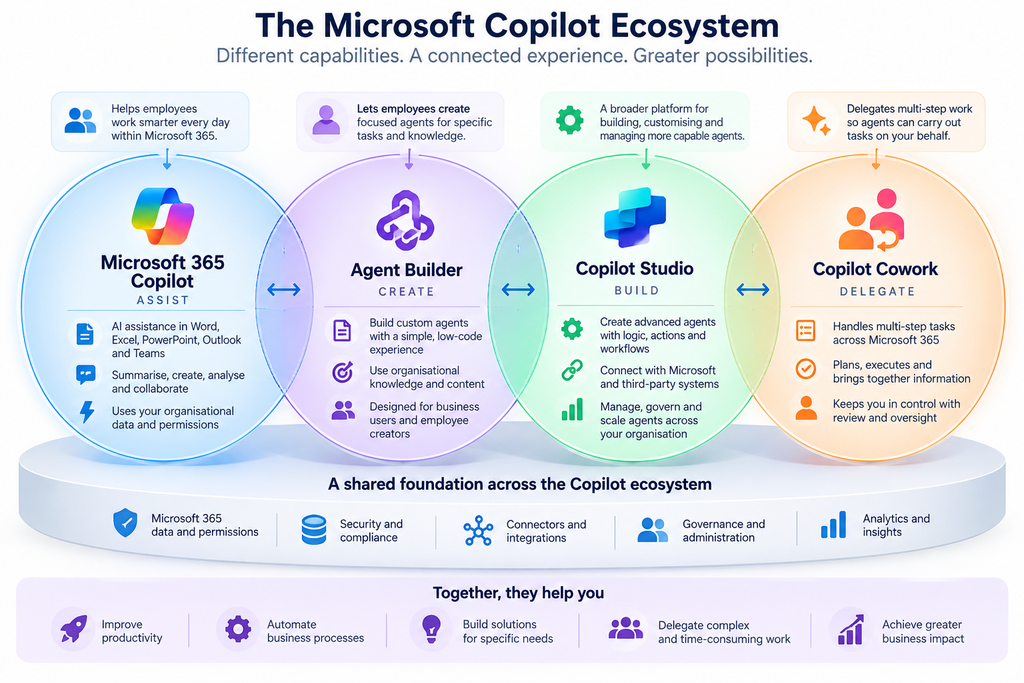
Microsoft’s Copilot ecosystem leaves behind a single AI assistant to cover all its bases. Features can support different needs: from your daily productivity to building your own agents or moving more complicated tasks to them.
From AI Assistance to Agentic Work
The use of AI in the workplace is evolving as well. It’s not only about getting support to perform a job anymore. AI now has specific tasks that it can handle, process step-by-step, and return to you.
The Key Copilot Capabilities
- Microsoft 365 Copilot: Productivity in the workplace
- Agent Builder: Focused custom agents
- Copilot Studio: Advanced agents, workflows, and integrations
- Copilot Cowork: Strings delegated, multi-step tasks
- Copilot Pro: AI support for each user.
Why the Distinction Matters for Businesses
There are things that work well for each side. So, it all depends on what you want AI to do on your behalf, how much you want to personalize it, and who will be using it.
What Is Microsoft 365 Copilot?
Microsoft 365 Copilot leverages AI to help people work more effectively with Microsoft apps that they use on a daily basis. It can collaborate on your documents, emails, meetings, spreadsheets, and presentations. It also enables you to get from the blank page to productive work faster, or from the wall of information to a useful one.
What Can Microsoft 365 Copilot Do?
The capabilities of each app are different; however, the common uses are:
- Word: Write, rewrite, edit, and summarise writing
- Excel: Analyze data, generate insights, formulas, and visuals
- PowerPoint: Build and enhance presentations
- Outlook: Compose e-mail messages and update status e-mail exchanges
- Teams: Capture minutes from meetings, conversations, action items
Who Is Microsoft 365 Copilot For?
It’s primarily for people who work and want to integrate AI into their day-to-day routines, whether writing, analyzing, communicating, or collaborating.
Microsoft 365 Copilot vs Custom Agents
It depends on what you need it for. Custom agents can be created for specific business requirements, knowledge, and tasks, whereas people can use Microsoft 365 Copilot in their everyday tasks.
What Is Microsoft Agent Builder?
Microsoft Agent Builder helps users easily add AI agents with specific characteristics in the Microsoft 365 scope. There isn’t a huge, complicated solution; this user is able to create an agent whenever he or she has a set of requirements, gives them user direction, and builds them according to their own guidelines and business information.
What Can You Build with Agent Builder?
Agent Builder works well for focused requirements such as:
- Answering questions about specific business information
- Helping employees find or understand relevant knowledge
- Supporting recurring, well-defined tasks
- Creating an agent around a particular topic or work area
Who Is Agent Builder For?
Useful and targeted agents are easily built for business users who want to support an agent-development environment but don’t need a full development environment. The experience makes custom AI accessible to all who are familiar with the problem in business that they want to address.
When Is Agent Builder Enough?
Agent Builder can be a good fit when the requirement is:
- Simple and focused
- Knowledge-based or targeted
- Easy for business users to manage
- Not complex enough to justify a broader development platform
For companies with more complex requirements, they will probably need a better agent creation solution for small enterprises, such as Copilot Studio.
What Is Microsoft Copilot Studio?
Copilot Studio is a low-code AI agent, workflow builder, and manager tool from Microsoft. It provides businesses with more options to customize the use of knowledge, think about requests, and provide business process support through agents.
What Can You Build with Copilot Studio?
Agents can be created for particular needs, and tedious tasks may feature AI, data, tools, actions, and workflows.
- Automating repeatable business processes
- Handling specialized employee or customer requests
- Working with business knowledge and data
- Taking actions based on user requests
Copilot Studio Integrations and Actions
Agents can be connected to Microsoft and third-party services via predefined or custom connectors, APIs, workflows, and more, all provided by Copilot Studio. This allows business agents to access information or take action in one or more business systems.
Copilot Studio for Enterprise Agent Management
After agents have moved past the simple experiments, there have to be methods for publishing, monitoring, administering, and governing their experiments. Copilot Studio supports deployment into channels, analytics, data policies, access control, and ongoing management.
When Should You Use Copilot Studio?
Copilot Studio is a suitable option for companies that want more extensive and knowledge-driven agents and want their organization to be customizable, integrated, automated, have actions, and provide control.
Microsoft Copilot vs Copilot Studio: What’s the Difference?
Microsoft Copilot and Microsoft Copilot Studio are different and serve different purposes. Copilot, the flagship offering, can automate repetitive tasks, and Copilot Studio is a comprehensive platform to create and train custom AI agents for businesses.
Purpose and Primary Role
Microsoft 365 Copilot enhances workflows employees already use in Microsoft 365. Copilot Studio provides a platform for building individual agents to meet specific business requirements, processes, and automation requirements.
Users and Skill Requirements
Microsoft 365 Copilot is designed to be used by average business users and should not overly stress technical competency. Copilot Studio is tailored for groups that require flexibility with their team, and could include a member from either the business, IT, or technical team.
Capabilities and Use Cases
Microsoft 365 Copilot can help with tasks such as:
- Drafting and summarizing content
- Analyzing information
- Supporting communication and collaboration
- Working within Microsoft 365 applications
Use Copilot Studio for specialized processes when businesses require custom agents, workflows, actions, or automation.
Integrations, Actions, and External Systems
Copilot Studio offers more flexibility in connecting agents to business applications, external data, connectors, APIs, and actions. This is helpful when an agent needs to do more than just share information or help someone with a specific task.
Deployment, Governance and Management
Microsoft 365 Copilot uses the same interface as Microsoft 365, and Copilot Studio delivers extended functionality for deploying, administering, monitoring, and governing custom agents.
Comparison Table: Microsoft Copilot vs Copilot Studio
| Decision Factor | Microsoft 365 Copilot | Copilot Studio |
|---|---|---|
| Primary role | Employee AI assistance | Custom agent development |
| Main audience | Business users | Business, IT, and technical teams |
| Main purpose | Everyday productivity | Specialized business needs |
| User experience | Ready-to-use AI assistance | Build and customize agents |
| Customization | More limited | Extensive |
| Agent creation | Focused experiences | Advanced agent development |
| Business workflows | Limited to supported experiences | Advanced workflows and automation |
| Actions | Task assistance | Custom actions and automation |
| Integrations | Microsoft 365 ecosystem | Microsoft and external systems |
| Connectors | Available within supported scenarios | Broader connector options |
| External systems | More limited | Stronger integration capabilities |
| Technical involvement | Generally low | Can require greater technical input |
| Deployment | Microsoft 365 experiences | Multiple deployment options |
| Governance | Microsoft 365 controls | Agent-specific administration and governance |
| Best suited for | Everyday employee productivity | Custom business processes and automation |
Microsoft Copilot vs Copilot Studio Licensing
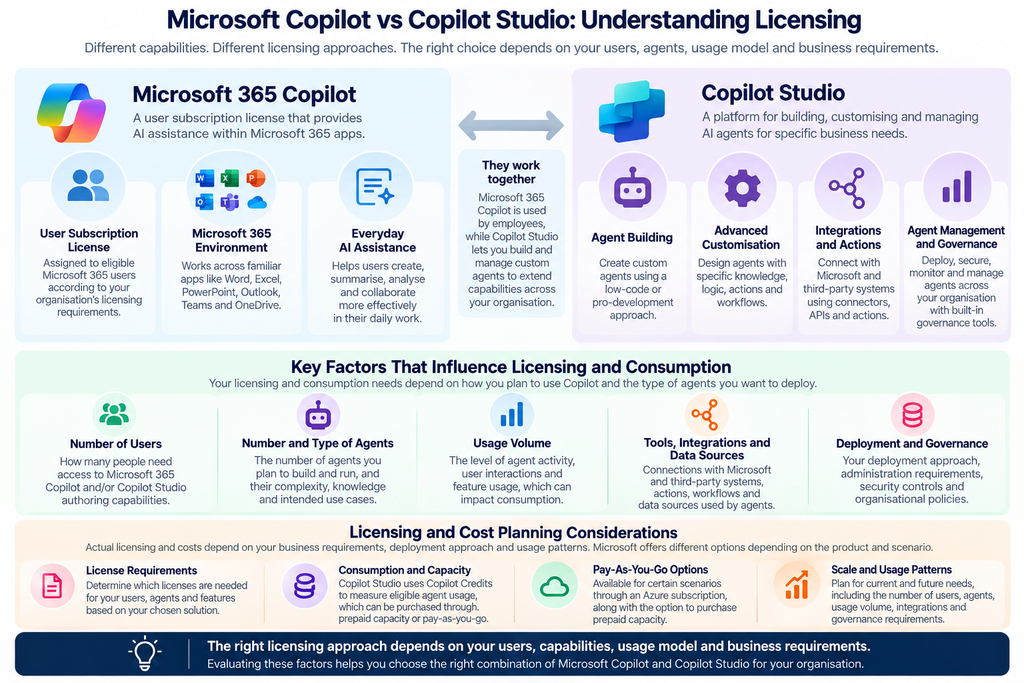
When comparing any two options, Copilot vs Copilot Studio license, companies need to consider more than the surface-level subscription fee. Licensing may be different based on product, users, type of agent, and the number of agents utilized.
Microsoft 365 Copilot Licensing
Licensed for qualified Microsoft 365 customers, the Copilot license is intended for exclusive access to Copilot features in the Microsoft 365 world. Sometimes, users can create and use some internal agents within Copilot’s interface as a licensed user.
Copilot Studio Licensing
Copilot Studio uses a separate licensing & consumption model. Standalone Copilot Studio licensing enables organizations to build agents for a wider range of scenarios, and Microsoft 365 Copilot provides selected capabilities of Copilot Studio to agents for all users, including those licensed users.
Copilot Credits and Usage
Copilot Credits are the standard unit for using Copilot Studio. They vary according to the agent’s design, user activity, and features or actions, etc.
Pay-As-You-Go and Capacity Considerations
Depending on their needs, organizations can select prepaid capacity or pay-as-you-go capacity. Plan and manage prepaid options in advance that involve paying for a fixed amount of Copilot Credit, or pay-as-you-go billing for the Copilot Credit that you actually use.
What Should Businesses Consider Before Choosing a License?
Before deciding, consider:
- Number of users and agents
- Expected usage volume
- Required integrations and automation
- Agent complexity and actions
- Governance and administrative requirements
- Whether usage is predictable or likely to fluctuate
Making the decision about licensing should be based on how the business know they will use Copilot, not on the features available.
I
Copilot Pro vs Copilot Studio: What’s the Difference?
Copilot Pro is, of course, very different from Copilot Studio. Copilot Pro is a personal subscription for anyone seeking advanced AI features, and Copilot Studio is a corporate platform for developing and managing personalized AI agents. Microsoft
What Is Copilot Pro?
Copilot Pro addresses the needs of individual users seeking specific additional capabilities of Copilot in supported Microsoft experiences. It’s ideal for personal productivity, content creation, and other personal use cases instead of enterprise-level custom agent strategies.
Copilot Pro vs Microsoft 365 Copilot
This segregation is primarily with regard to the user of the service and the place of its implementation. Copilot Pro is an individual-focused offering; Copilot is integrated into work apps and can access data from the organization, which is a different option and subject to licensing controls and admin requirements.
Copilot Pro vs Copilot Studio
| Factor | Copilot Pro | Copilot Studio |
|---|---|---|
| Intended users | Individuals | Businesses and organizations |
| Primary purpose | Individual AI assistance | Custom agent development |
| Custom agents | Limited to supported experiences | Build and customize agents |
| Business integrations | Not its primary focus | Supports business and external integrations |
| Governance | Individual subscription controls | Organizational administration and governance |
Where Copilot Pro Fits
Businesses tend to find more value in Microsoft 365 Copilot and Copilot Studio when they want to help employees, work with their organization’s data or customize business agents. Copilot Pro should be viewed as a stand-alone AI solution and too small to replace an enterprise agent platform.
What Is Microsoft Copilot Cowork?
Unlike the AI applications that have previously been available, Microsoft Copilot Cowork enables users to entrust more complicated, multi-step tasks to AI. Copilot can plan and execute the work throughout Microsoft 365, involving the user when there is a need for review or approval.
How Copilot Cowork Works
The process is straightforward:
- Delegate: Give Copilot a defined piece of work.
- Plan and execute: Cowork breaks the request into steps and works through them.
- Review: The user reviews the outcome and stays involved at appropriate points.
What Can Copilot Cowork Do?
Depending on the task, Cowork can support work such as:
- Researching a topic and gathering information
- Working with files and creating documents
- Coordinating information across Microsoft 365
- Preparing or sending emails
- Helping schedule meetings and related follow-up work
Copilot Cowork vs. Traditional Copilot Assistance
The distinction is simple:
- Copilot: Helps the user perform a task.
- Cowork: Carries out a defined piece of delegated work on the user’s behalf.
Who Can Benefit from Copilot Cowork?
Cowork is designed for business users and knowledge workers who often work multiple steps on multiple sources, files, and/or applications.
Copilot Studio vs Cowork: What’s the Difference?
Copilot Studio and Cowork address different stages of AI-enabled work. One is about creating and controlling Agents, and the other is about tasks delegated to the AI.
- Build vs Delegate: Build and customize agents vs delegate multi-step work.
- Capabilities and Control: Customize, integrate, automate vs delegate with user oversight.
- Typical Business Scenarios: Business automation vs complex, multi-step knowledge work.
- Can They Work Together? Custom agents and delegated work can complement each other.
Copilot Studio vs Cowork: Comparison Table
| Factor | Copilot Studio | Copilot Cowork |
|---|---|---|
| Primary role | Build and manage agents | Delegate work |
| User interaction | Create or use agents | Assign tasks |
| Customization | High | Task-focused |
| Work execution | Agent-driven actions and workflows | Multi-step delegated work |
| Integrations | Broad | Microsoft 365 focused |
| Governance | Organizational controls | User and organizational oversight |
| Typical use case | Business process automation | Complex knowledge work |
How Microsoft Copilot, Agent Builder, Copilot Studio & Cowork Work Together
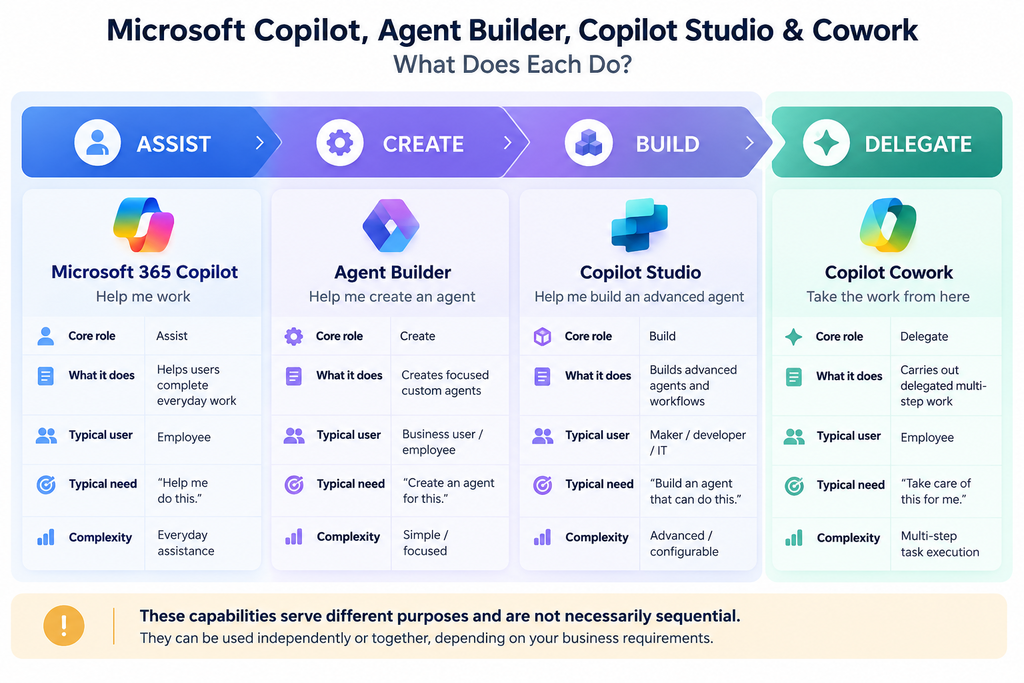
These capabilities can support different layers of an organization’s AI strategy. They do not have to be used together or follow a fixed sequence. Businesses can adopt one capability or combine several based on the work they need AI to handle.
Assist, Create, Build and Delegate
A simple way to understand their roles is:
- Assist: Microsoft 365 Copilot helps employees with everyday work.
- Create: Agent Builder enables focused custom agents.
- Build: Copilot Studio supports more advanced agents and automation.
- Delegate: Copilot Cowork handles defined, multi-step work.
From Employee Assistance to Custom Agents
Employees can use Microsoft 365 Copilot for everyday productivity while using Agent Builder for focused needs. When requirements become more advanced, Copilot Studio can support more customized agents and business processes.
From Agents to Delegated Work
When the need shifts from getting assistance to handing off a defined piece of work, Cowork provides a delegated-work experience.
Example of a Connected Copilot Workflow
For example, an employee could use Microsoft 365 Copilot to review information, an Agent Builder agent to answer recurring questions, Copilot Studio to support a specialized business process, and Cowork to carry out a related multi-step task. Not every workflow needs all four.
Microsoft Copilot, Agent Builder, Copilot Studio & Cowork: Business Use Cases
The right Copilot capability depends on what the business needs AI to do, from everyday assistance and focused support to process automation and delegated work.
- Everyday Productivity: Draft content, summarize information, analyze data, and support day-to-day collaboration with Microsoft 365 Copilot.
- Focused Business Agents: Creating targeted agents with Agent Builder to answer questions, work with specific knowledge, or support defined tasks.
- Advanced Business Processes: Using Copilot Studio for specialized agents, integrations, workflows, actions, and business process automation.
- Delegated Multi-Step Work: Handing defined, multi-step tasks to Copilot Cowork when the work involves planning, execution, and review.
Business Use Case Comparison
| Business Requirement | Relevant Capability |
|---|---|
| Everyday employee productivity | Microsoft 365 Copilot |
| Focused knowledge or task support | Agent Builder |
| Custom agents and process automation | Copilot Studio |
| Complex, multi-step delegated work | Copilot Cowork |
Data, Security & Governance for Microsoft Copilot
AI adoption requires more than choosing the right Copilot capability. Businesses also need to consider how data is accessed, protected, connected, and managed.
- Data Access and Permissions: Existing permissions determine which organizational information Copilot can access.
- Security and Compliance: Protect business data while meeting security, privacy, and compliance requirements.
- External Data and Integrations: Connected systems require careful control over access, data flows, and permissions.
- Governance and Administration: Define ownership, deployment policies, monitoring, lifecycle management, and organizational oversight.
- Human Oversight: Keep people involved when AI handles sensitive information or business-critical actions.
What Is Work IQ?
Work IQ is Microsoft’s approach to giving Copilot a deeper understanding of an organization’s working context. It can help AI interpret how people, information, and work connect across the business.
This context can include organizational relationships, work activity, content, and permissions, helping Microsoft Copilot provide responses that are more relevant to the user’s role and working environment.
For Microsoft 365 Copilot, contextual understanding matters because useful AI assistance depends not only on what information exists, but also on how that information relates to the person asking.
Scout and Emerging Microsoft Copilot Capabilities
Microsoft is extending Copilot toward more proactive and agentic experiences. Some of these capabilities are still developing or available through preview programs, so businesses should assess maturity before adoption.
- Microsoft Scout: A desktop AI application that can act across files, browsers, shell tools, and Microsoft 365 data, with user approval for sensitive actions.
- Why Emerging Capabilities Matter: Evaluate availability, maturity, governance, permissions, and practical business value before wider deployment.
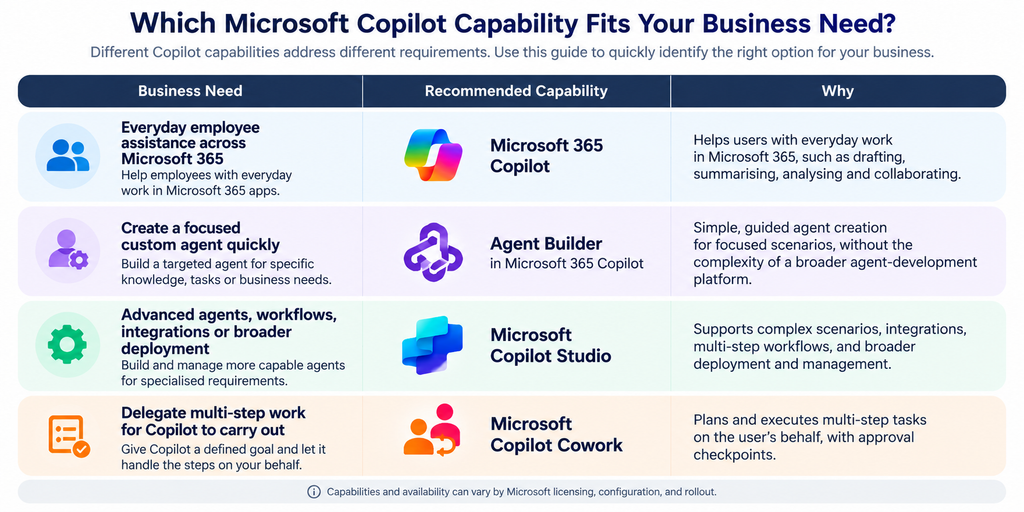
Which Microsoft Copilot Capability Fits Your Business Need?
The best choice depends on what you want AI to accomplish, who will use it, how much customization is needed, and whether you need assistance, agent creation, advanced development, or delegated execution.
- Choose Microsoft 365 Copilot when: Employees need everyday assistance across Microsoft 365 apps and organizational work.
- Choose Agent Builder when: Business users need focused agents for specific knowledge or tasks.
- Choose Copilot Studio When: Advanced agents require workflows, integrations, actions, or external systems.
- Choose Copilot Cowork when: Users want to delegate defined, multi-step work for AI to carry out.
Implementing Microsoft Copilot in Your Business
Successful Copilot adoption takes more than selecting the right capability. Businesses also need the right data, controls, people, and measurement in place.
- Define the Use Case: Start with a clear business problem and measurable outcome.
- Prepare Data and Access: Review data quality, permissions, access, and connected systems.
- Establish Governance: Set policies for security, usage, ownership, and ongoing oversight.
- Prepare Your People: Help employees understand capabilities, limitations, and responsible AI use.
- Measure and Refine: Track adoption, business impact, user feedback, and opportunities for improvement.
Common Mistakes Businesses Should Avoid
Choosing between Copilot capabilities can become confusing when businesses treat them as interchangeable. The right decision should reflect the actual work, users, data, and level of control required.
- Treating All Copilot Products as the Same: Different capabilities are designed for different types of work.
- Choosing Based on Features Alone: Focus on business needs rather than simply counting features.
- Overlooking Licensing and Usage: Consider expected usage, capacity, and ongoing costs.
- Ignoring Data and Governance: Address permissions, security, compliance, and oversight before deployment.
- Assuming More Advanced Means Better: A simpler capability may be the better fit for straightforward needs.
The Right Copilot Depends on the Work
No single Copilot capability fits every business need. Microsoft 365 Copilot supports everyday employee productivity, while Agent Builder helps create focused custom agents.
Copilot Studio is better suited to advanced agent development, integrations, workflows, and automation. Cowork takes a different approach by allowing users to delegate defined, multi-step work.
The important point is to match the capability to the work, rather than choosing the most advanced option by default. These capabilities can also complement one another as business needs evolve.
| Build the Right Microsoft AI Strategy for Your Business Choosing between Microsoft Copilot vs Copilot Studio is only the starting point. DynaSum IT helps businesses assess their requirements, plan implementation, connect Microsoft solutions, establish governance, and optimize AI adoption as needs evolve. Talk to a DynaSum IT Expert |
Frequently Asked Questions
1. Can an Agent Builder agent be moved to Copilot Studio later?
Yes. You can copy an agent created in Agent Builder into Copilot Studio when you need more advanced customization, integrations, or management capabilities.
2. Do businesses need to build every AI agent in Copilot Studio?
No. Agent Builder can be sufficient for focused, straightforward requirements. Copilot Studio is better suited to more complex business needs.
3. Can Microsoft Copilot agents be tested before wider deployment?
Yes. Businesses should test agents with representative users and scenarios before expanding access across the organization.
4. How can a business measure whether Copilot is delivering value?
Track adoption, time saved, task completion, user feedback, quality improvements, and measurable business outcomes.
5. What should businesses do before rolling out Copilot agents?
Review use cases, data access, permissions, security, governance, user readiness, and success measures before wider deployment.